
One part of a recording is too quiet, or has noise: how to fix it
You play back a meeting recording andthe first few seconds are a chair being dragged. Orone person is too quiet to make out, and only their turns. You do not want to change the whole recording — just that part.
AudioMass does exactly that, for free. No install, no account: open it in a browser, drag across the part you want to change, pick something from a menu.We used it and measured it — the network traffic and the processing time (checked 2026-09-25).
1. When you need this
- A thump or a cough in the first and last few seconds
- One participant is quiet, and only their turns are unintelligible
- Someone knocked the microphone, once, halfway through
- Two minutes of small talk in the middle that you want gone
2. What AudioMass is
- Free, with no account.
- Written by Pantelis Kalogiros. The source is public, and the project's own code is MIT-licensed (bundled third-party libraries keep their own licences).
- Processing happens inside your browser. Your audio is not sent anywhere — we check that in section 4.
- It covers a lot of ground: 19 effects, including gain, fades, noise reduction, EQ, compressor, reverb, reverse and silence removal.
3. How to use it (4 steps)
- Open audiomass.co. A welcome panel appears first — press Esc or click outside it to dismiss it.
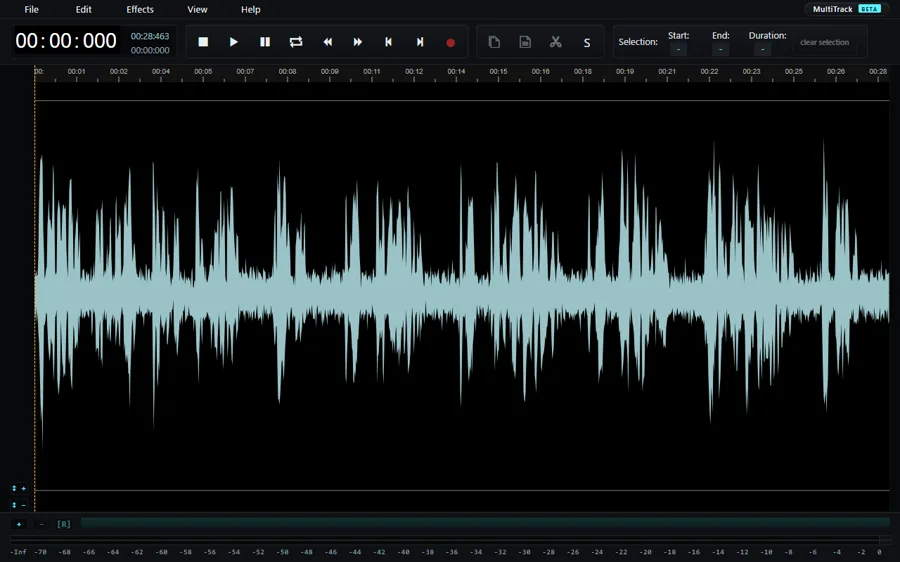
- File → Load from Computer, or drag a file onto the window. A waveform means it loaded.
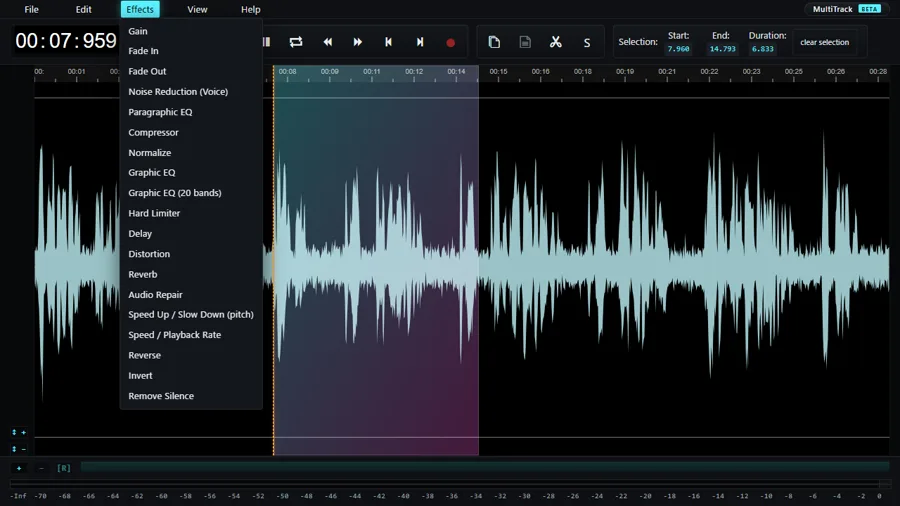
- Drag across the waveform to select the stretch you want to change. The length of the selection appears as Duration at the top right. Shift + A selects everything.
- Pick something from Effects — Gain for volume, Fade Out to taper the end, Noise Reduction (Voice) for background noise. Then File → Export to save.
Shortcuts here use Shift, not Ctrl: Shift+Z to undo, Shift+C to copy, Shift+X to cut. Worth knowing before you conclude that undo is missing.
4. Checking that nothing is sent
"Runs in your browser" is a claim, not a fact, until you look. We loaded a 28.5-second recording, applied noise reduction and exported it, logging every request.
- Opening the page made 5 requests, all to audiomass.co itself, all for the page
- Between loading the file and exporting it, there wereno POST or PUT requests at all — nothing was sent outward
You can check it yourself without any tools: open the page, then disconnect from the internet. Loading, editing and saving all still work.
5. The numbers we measured
A 28.5-second, 48kHz, mono meeting recording, in Chrome on a desktop, on 2026-09-25.
| What we measured | Result |
|---|---|
| Page load | 2.4 s |
| Loading the file | A few seconds, until the waveform appears |
| Noise reduction, applied to the whole file | 1.5 s |
| Audio sent outward | 0 bytes |
We measured the noise reduction too. On a recording with air-conditioning noise mixed in, thespeech-quality figure improved by 4.2 dB. There are no settings to adjust: you select and click. It is built for speed rather than control.
6. Where people trip up
- WAV export is 44.1kHz. The export panel says so — "wav (44100hz)". A 48kHz file comes back at 44.1kHz, which can matter when you are matching audio to video.
- Undo is Shift+Z. Ctrl+Z does nothing, which reads as "there is no undo".
- Long recordings get heavy. The whole waveform is held at once, so it is not built for multi-hour files.
- Close the tab and your work is gone. That is the flip side of running purely in the browser. File → Save Draft Locally keeps a draft on your own machine; use it for long sessions.
7. When it fits, and when it does not
It fits
- Fixing one part of a recording
- Editing something you would rather not hand to a stranger, without installing anything
- A work computer where you cannot install software
- A one-off job that does not justify finding and learning an application
It does not
- Multi-hour recordings
- Layering several sources into a piece of music — the multitrack feature is still in beta
- Applying one change to a whole file. There are quicker ways to do that
8. If you want to fix the whole file
AudioMass for one part; our own tools when the whole file needs the same treatment. There is nothing to select, so it is open, drop, press.
- Remove background noise → Remove noise
- Even out the volume → Fix the volume
- Cut the head and tail → Trim audio
- Change the format → Convert audio
- Pull audio out of a video → Extract audio
Questions
Is there a translated interface?
No, English only. There is not much to read, though: File, Edit and Effects cover nearly everything.
Does it work on a phone?
Selecting means dragging across a waveform, which needs room. Use a computer.
Is it safe to use on a work computer?
Nothing is installed and nothing leaves the machine. Internal policies differ, though — if the recording is work material, check your own organisation's rules first.
Can I stop halfway and finish tomorrow?
File → Save Draft Locally keeps a draft on your own machine, and Open Local Drafts brings it back. Simply closing the tab does not keep anything.
Can it record as well?
Yes — File → New Recording captures from a microphone. It is not the thing to trust with a long unattended recording, though.