
A black box on a PDF does not delete the text
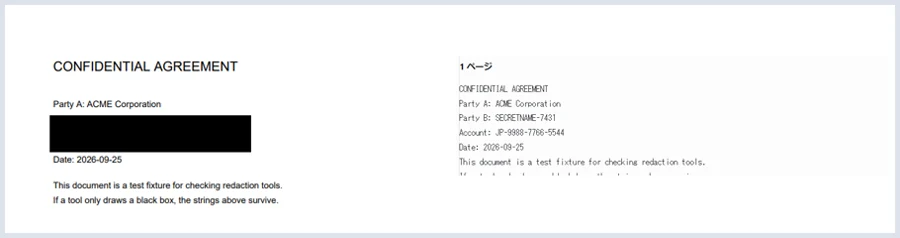
You blacked out the counterparty's name on a contract and sent it on. You hid a name in some minutes and published them.That PDF may still be carrying the text under the black box.The page looks solidly black, and the words copy out anyway.
We ran a test through a free online redaction service andgot the hidden name and account number straight back. The image above is the result (checked 25 September 2026).
1. What is actually happening
Inside a PDF, text and shapes are kept separately. Drawing a black rectanglelays something on top; the text underneath is untouched.
It is not like a marker pen on paper, where the ink physically covers the letters. It is closer to putting a sheet of black paper on top — move the sheet and you can read what is under it. And "moving the sheet" here means selecting the text.
The same applies when you draw a shape in Word and export to PDF, and to highlighting or fill formatting.
2. We tried it
We built a PDF containing two marker strings, SECRETNAME-7431 andJP-9988-7766-5544, put it through a free redaction service, drew a box over those two lines and exported.
The result looks right: the two lines are cleanly covered. Butextracting the text brings both of them straight back. The file barely changed size either — 1,206 bytes to 1,576. It grew by the size of a black rectangle, and lost not one character.
We are not naming the service. This is a category problem rather than one company's mistake, and it may well be fixed by the time you read this. What matters ischecking your own document.
3. Check your own file in 30 seconds
No tools needed — your PDF reader can do it.
- Open the redacted PDF.
- Press Ctrl + A (⌘ + A on a Mac) to select everything.
- Press Ctrl + C.
- Paste it into a text editor.
If anything you meant to hide appears, that file is not ready to send.If nothing pastes at all, the PDF has no text layer — which is the safe state.
Searching works too: type the hidden name into your reader's find box.A hit means it is still in there.
For documents too long to read through, we built a small tool:See the text inside a PDF. It lists everything that comes out, page by page.
4. What actually removes the text
The reliable route is to turn the pages into images. With no text layer left, there is nothing to copy and nothing to search — move the black sheet and the page underneath is blank.
A PDF editor's redaction feature also deletes the text itself. It is a different command from drawing a filled shape, so look for it by name. It is in paid software such as Adobe Acrobat Pro.
The surest approach of all is to not put the information in: delete it in the source document and export a fresh PDF.
5. A free service that does it properly
You do not have to buy anything. We testedJobDoneBot's PDF redaction.
- It offers two modes — full removal, and a fast "visual only" one — and explains the difference on screen. Full removal is the default.
- Extracting text from a file it had processed produced nothing at all. The file also grew from 1,206 to 28,412 bytes, which is what rasterising looks like.
- No account, no install, and the file is not sent to a server.
That is what we found on 25 September 2026. Software changes, so for anything that matters,check it yourself using section 3.
6. What safe redaction costs you
Removing text by rasterising has an unavoidable price:the whole document stops being searchable and copyable, not just the hidden part. Every character on every page becomes an image.
That is awkward for anyone who wants to quote from it, or to find it again later. It is inherent to the method rather than a flaw in any particular service.
To keep the rest of the document searchable, use a PDF editor's redaction feature, which deletes only the characters you selected.
Questions
Is taking a screenshot and reinserting it safe?
Yes. A screen capture has no text layer, so nothing can be copied out of it. It is laborious but dependable.
What about printing and re-scanning?
Also safe — going through paper destroys the text layer completely. You lose image quality and time.
I drew a black shape in Word and exported to PDF. Am I all right?
Probably not. The shape sits on top; the text stays. Check it with section 3.
I cannot select the blacked-out part. Does that mean it is safe?
It does not tell you either way. Text that resists a local selection can still come out when you select the whole document. Always test withselect-all.
Is an image-only PDF automatically safe?
Safe as far as the text layer goes. But if the black box isa separate shape sitting on the image, removing that shape reveals the picture beneath. Paint over the image itself before making the PDF.
I have already sent it. What now?
First establish whether the text really is in there, using section 3. What to do next depends on your organisation's rules — raise it with whoever is responsible rather than deciding alone.