
A recording is too quiet to hear: how to fix it
You play the recording back and the voices are barely there. Even at full volume they sound distant.Most of the time this can be fixed afterwards by raising the level. Raise it the wrong way, though, and the sound distorts and becomes harder to follow, not easier. Here is how to do it properly.
1. First, check that it really is the file
Before changing anything, rule out the simple causes. If any of these fixes it, the file is fine.
- The device volume — and whether headphones are still connected.
- The player's own volume slider, which is separate from the system volume.
- Another file — play some music on the same device. If that is quiet too, it is the device.
If everything else sounds normal and only this recording is quiet, the level really was recorded low.
2. Why recordings come out quiet
Level is mostly decided by distance. Double the distance to the microphone and the sound reaching it drops to a quarter. In practice the cause is usually one of these:
- The phone was on the table and the speaker was far away — two or three metres is enough to make it faint.
- The microphone was covered — face down on a desk, under a notebook, or inside a thick case.
- The input level was set low on the recorder or recording app.
- A meeting app turned down microphones that were not actively speaking.
None of these can be undone after the fact. What can be done is to raise what was recorded.
3. Raise the volume
Drop the file onto Fix the volume and it measures the current level first, then tells you how much it can add. Everything runs inside your browser, so the recording is never uploaded — which matters for meetings and interviews.
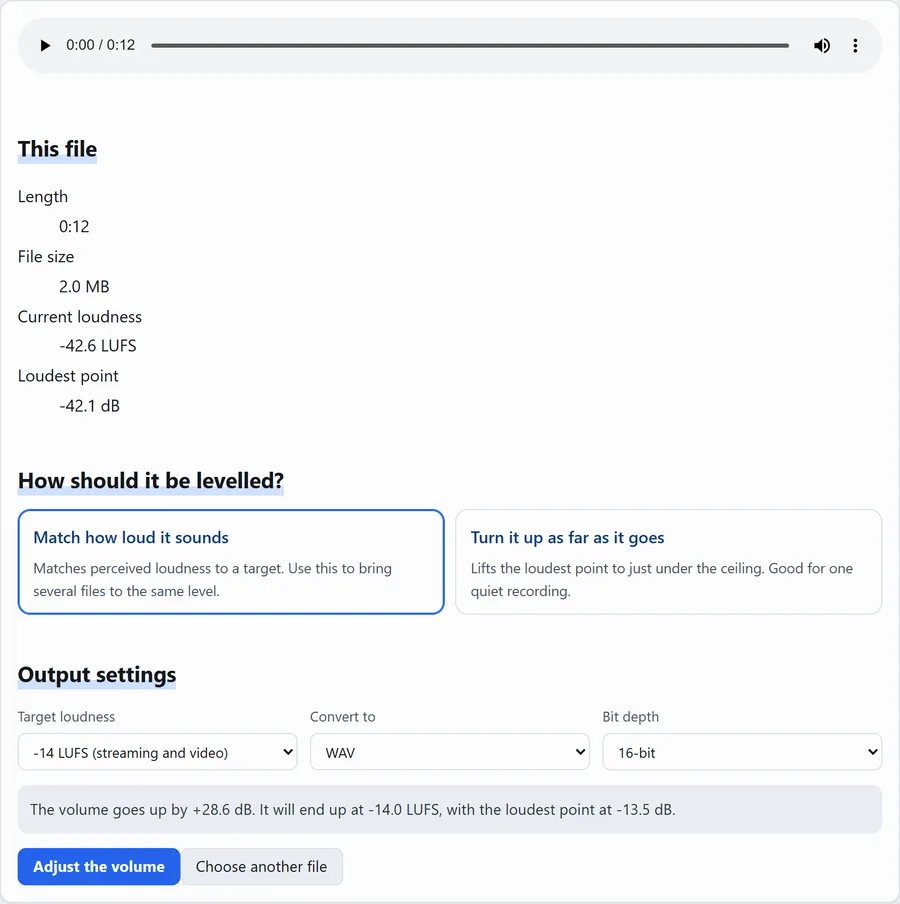
Steps
- Drop the recording onto the page (MP3, WAV, M4A and others all work).
- Under "How should it be levelled?", choose "Match how loud it sounds" — the right choice in most cases.
- Leave the target at -14 LUFS. That is the level used by video and streaming platforms.
- Press "Adjust the volume", listen to the result on the page, and download it.
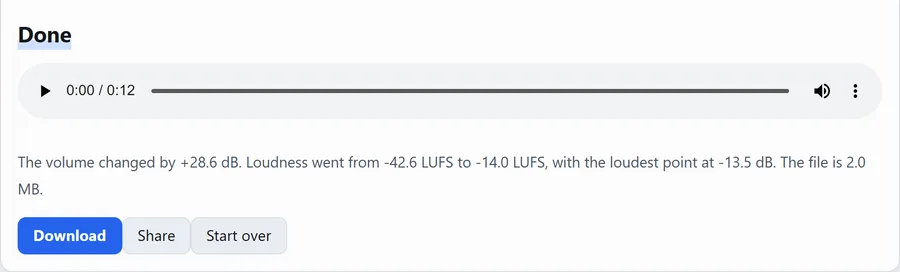
Have the file to hand? You can do this right now.
4. What LUFS means
LUFS measures how loud something sounds to a person, rather than its raw signal level. Closer to zero is louder; a large negative number is quiet.
- Around -14 LUFS — what video and music platforms use. Comfortable at a normal volume setting.
- -23 LUFS — the European broadcast standard (EBU R128); Japanese TV uses -24 LKFS. Noticeably more reserved.
- Below -35 LUFS — genuinely quiet. The example above, at -42.6 LUFS, is in this range.
5. What clipping is
Sound has a ceiling, and anything above it gets cut flat. That is clipping, and it sounds harsh and gritty.Once a recording clips, it cannot be repaired.
So the tool stops just short of it. If it says it has stopped to avoid distortion, that is the limit for that file. If it still sounds too quiet, read on.
6. When louder is still not clearer
Raising the volume raises the noise along with the voices — air conditioning, papers, taps on the desk. If the noise is louder than the speech, volume is not the answer. What can help:
- Cut out just the part you need.Trim audio makes a short section you can replay easily.
- Slow it down. Most players have a speed setting; 0.75× often makes speech intelligible.
- Fix the next recording. This matters most: point the microphone end of the phone at the speaker, put it flat on the table within a metre, and keep it uncovered. The difference is dramatic.
Questions
Is my recording uploaded?
No. Everything happens inside your browser, and our server has no way to receive audio. You can disconnect from the internet after the page has loaded and it will still work.
Can I match several recordings to the same volume?
Yes — choose "Match how loud it sounds" and use the same target (say -14 LUFS) for each file. Because it measures perceived loudness, different recordings end up sounding equally loud.
What if the quiet audio is in a video?
Use the simple video editor to change a clip's volume in the video itself. If you only need the sound, Extract audio gives you an MP3 you can then level with the steps above.
Does this hurt the quality?
Save as WAV or FLAC and nothing changes except the level. Save as MP3 or M4A and there is a small amount of compression loss, which you are unlikely to hear.
Related
- Fix the volume — the tool used here.
- Trim audio — keep just the part you need.
- Extract audio — pull the sound out of a video.
- All posts