
A video is too large to send: how to fix it
You attach the video and the message bounces back: file too large. The upload form refuses it. A single minute filmed on a phone is often more than 40 MB. There are three ways out, and picking the right one saves you the most quality.
1. Find out the limit first
You cannot aim without a target. The usual limits:
- Gmail — 25 MB. Above that it switches to sending a Google Drive link instead of an attachment.
- Work email — often capped nearer 10 MB. It may send and still be rejected at the other end.
- Upload and application forms — follow whatever the page states.
One thing matters more than the number itself: do not aim exactly at the limit. Email attachments are re-written as plain text before they are sent (base64 encoding), and that makes the fileabout 1.33× larger on the way. A 10 MB video counts as roughly 13 MB inside the message, before the text and signature are added.
So aim for about 70% of the limit: 7 MB for a 10 MB cap, 18 MB for Gmail's 25 MB. Microsoft puts the same rule in its mail server documentation — set a 64 MB limit and you can really send about 48 MB.
These limits change from time to time, so check what the service says before you start.
2. Which of the three
- Compress it — keep the whole video, accept some loss of quality.Best when the clip is one to three minutes and all of it matters.
- Cut it — keep full quality; the size falls in proportion to the length.Best when only part of a long video matters. This is the option that costs you the least.
- Send a link — upload it somewhere and share the URL.Best when quality must not drop at all, provided the recipient can download from that service.
When in doubt: cut first, then compress if it is still too big. Taking one minute out of a ten-minute video already divides the size by ten. Trim video does that part.
3. Shrink it to a size you name
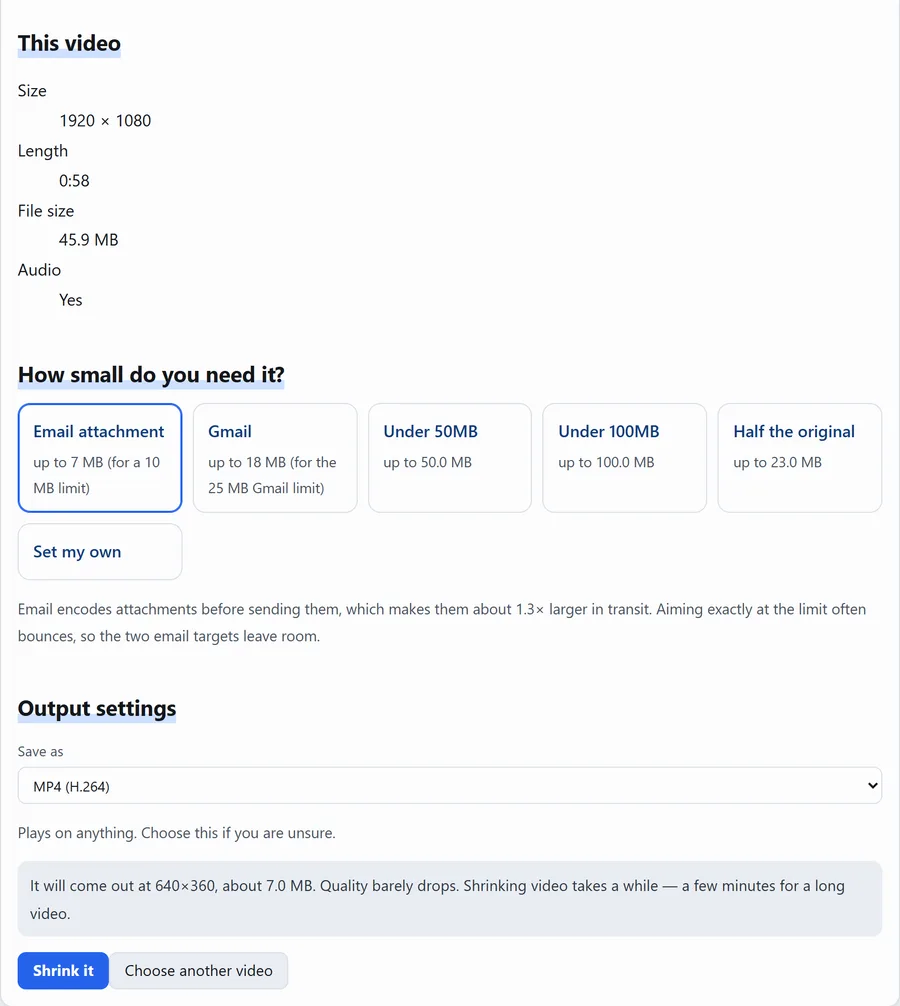
On Compress video you say how many megabytes you need, and the resolution and quality are chosen to fit. The video is processed inside your browser and never uploaded.
Steps
- Drop the video onto the page.
- Under "How small do you need it?", pick Email attachment (7 MB, sized for a 10 MB cap) orGmail (18 MB), or use "Set my own" to type an exact figure. The encoding overhead above is already allowed for in those two.
- Read the prediction — resolution and final size. If you are happy with it, press "Shrink it".
- Save the MP4.
It takes about as long as the video itself, sometimes a little longer. Leave the page open while it works.
Name a size and it fits the video into it.
4. How much quality you actually lose
There are two ways to make a video smaller: lower the resolution (fewer pixels) orcompress harder (same pixels, less detail in each). The tool balances both to hit your target.
- 1080p squeezed into 7 MB — possible for a short clip, but fast motion turns blocky.
- 640×360 at 7 MB — the example above. Fine on a phone; on a full laptop screen you can see the softness. If you have room, 25 MB or 50 MB looks considerably better.
- Text or screen recordings — dropping the resolution makes text unreadable. Keep the resolution and shorten the video instead.
If you ask for something impossible, the page says so before it starts rather than failing after several minutes of work.
5. When it still will not fit
- Shorten it. Size follows length almost exactly —Trim video.
- Drop the audio if you do not need it —Remove audio from video. It saves a few MB; the picture is what fills a video file.
- If one moment is enough, send an image.Grab a still gives you a few hundred KB.
Questions
Is my video uploaded?
No. Everything happens inside your browser, and our server has no way to receive video files.
Does the sound survive?
Yes. You get a single MP4 with the audio still in it.
How large a video can I open?
Up to 1 GB. Long 4K footage can exceed that — cut it first withTrim video, then compress.
Can I get the original quality back afterwards?
No. What compression discards is gone, so keep the original file and send the smaller copy.
Related
- Compress video — the tool used here.
- Trim video — keep only the part you need.
- iPhone video will not play on Windows
- All posts