
Transcribing a recording without uploading it
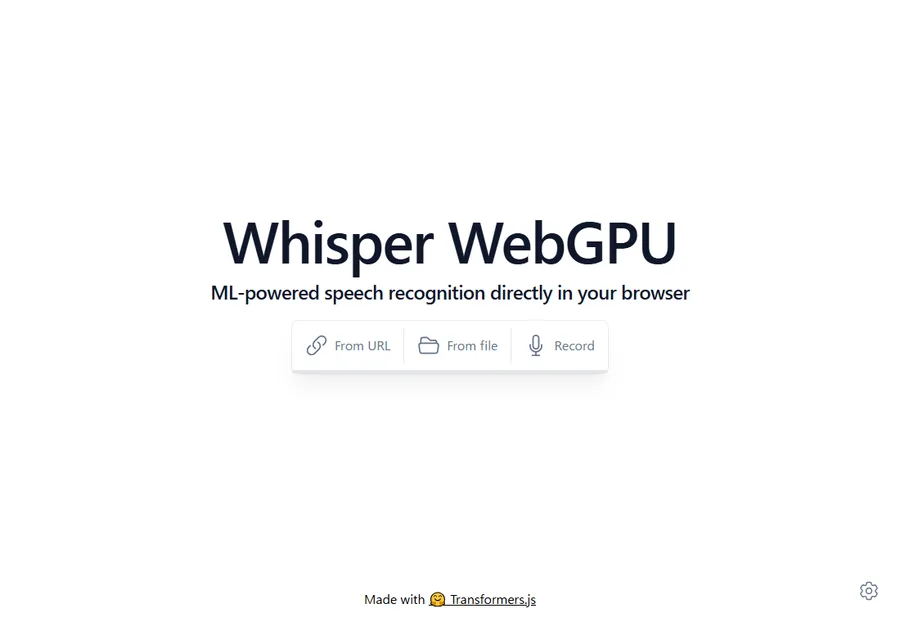
You want a meeting transcribed, but the contents are sensitive enough thathanding the whole recording to a service feels wrong. There is another option: run OpenAI's Whisperinside your own browser. It is free and needs no account. We tested it properly, in two languages:in English it was word-perfect, while in another language one wrong setting turns the output into complete nonsense.
1. What it is
Whisper WebGPU is a public demo built on Transformers.js. It downloads the model into your browser and does the work on your own machine. The audio is never sent anywhere — we verify that in section 7.
- Free, no sign-up. Open the page and go.
- Chrome or Edge required, because it uses WebGPU to reach your graphics hardware.
- The model is downloaded on first use: 120 MB, 206 MB or 586 MB, your choice.
- There are three buttons and one settings panel. That is the whole interface.
2. The trap: it defaults to English
Feed it Japanese audio without touching the settings and you get this — our own first attempt:
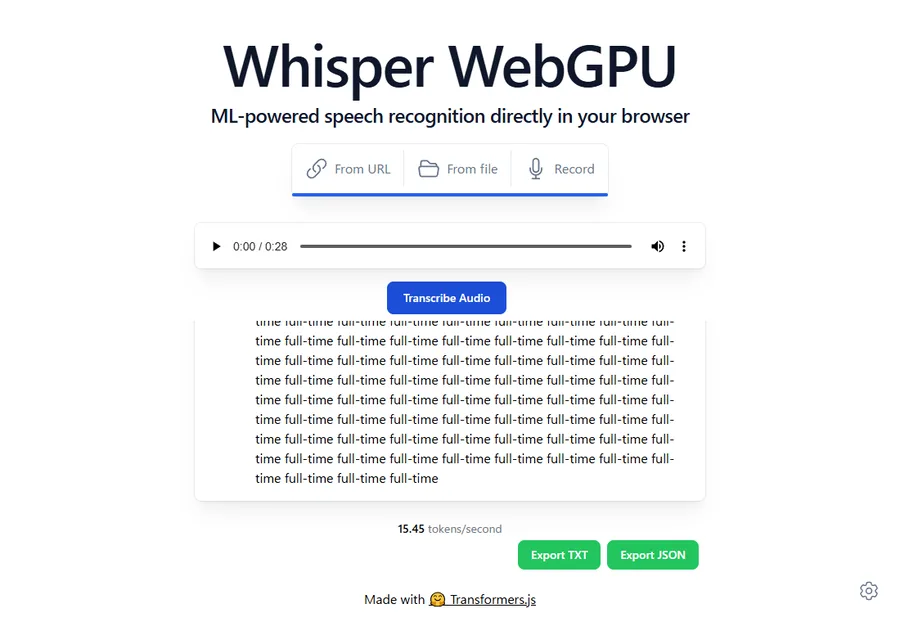
The tool starts in English-only mode. Give it another language and it tries to hear English anyway, then falls into a loop. It looks like the tool is broken for your language. It is not —there is a switch, and it is easy to miss.
3. How to use it
- Open Whisper WebGPU in Chrome or Edge.
- Click the gear icon in the bottom-right corner. This is the part people miss.
- Tick Multilingual, then pick your language below it.
- Close the panel, choose "From file" and pick your audio.
- Press "Transcribe Audio" and wait.
- Save the result with Export TXT or Export JSON.
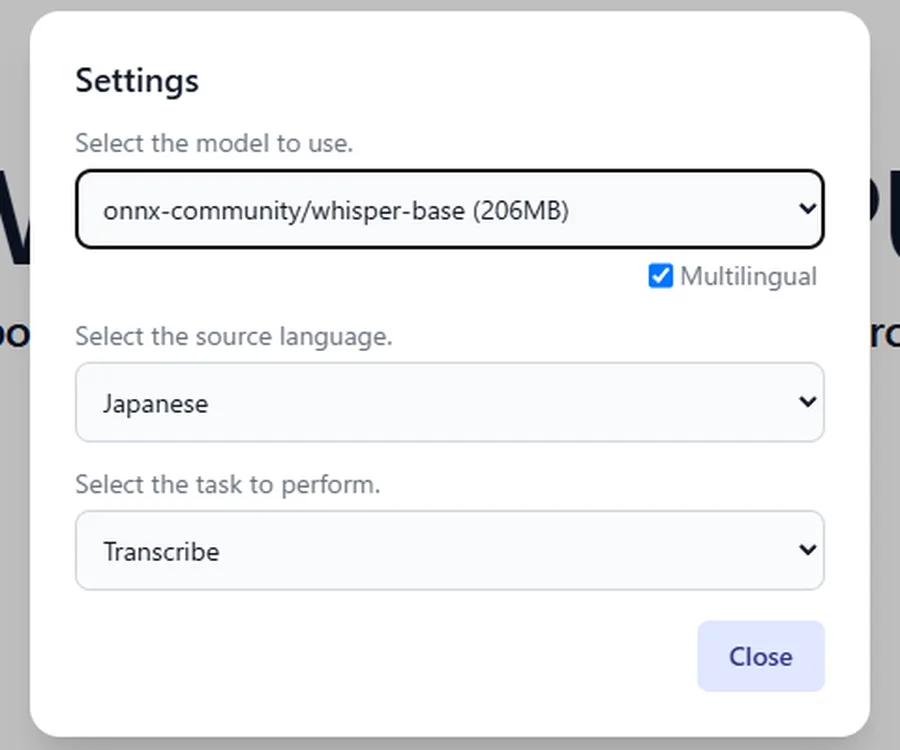
Setting the task to Translate (to English) turns speech in another language directly into English text — handy for sending minutes to colleagues abroad.
4. How accurate it is
We used a 28-second announcement of the kind you would actually record in a meeting, with a date, a time, a room name and an ordered agenda — the things that matter and are easy to get wrong.
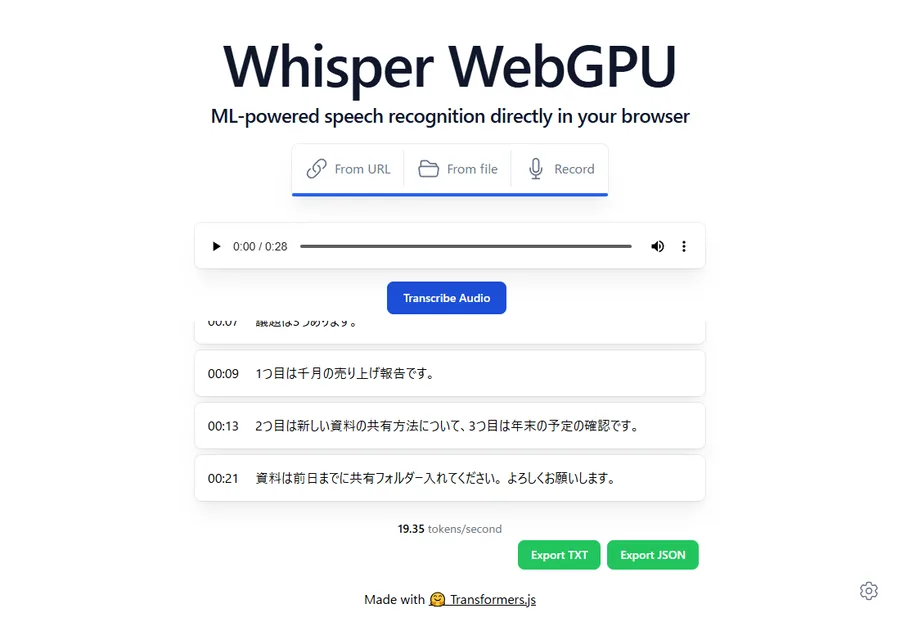
With the standard 206 MB model:
- Right: sentence structure, the agenda items, the room name, the closing courtesies. Spoken numbers were correctly turned into digits.
- Wrong: the weekday, the time of the meeting, and the word "last month".
Notice what it got wrong: the date and the time — exactly the parts a meeting record exists for. The text reads smoothly, so an error there slides past unnoticed.Check dates, times, figures and names against the audio yourself.
In English, it was flawless
We read the same announcement in English and ran it through the standard model.Every word was correct — the date, the time, the room name: exactly the details it had fumbled in the other language.
Whisper has far more English training behind it, and it shows. So forinternational meetings, English-language interviews and research recordings, this is genuinely practical rather than a curiosity. In other languages, treat the output as a draft and check the dates yourself; in English, there is little left to fix.
5. Does a bigger model fix it?
We switched to the 586 MB model and ran the same audio again.
- Fixed: "last month", the particle in "into the shared folder", and the line breaks.
- Still wrong: the weekday, and the time (from one kind of nonsense to another).
So a larger model lifts general quality but does not make dates and times trustworthy. Speed barely changed (38 s versus 40 s for 28 seconds of audio). If you can afford the one-off 586 MB download, take the bigger model.
6. Noise, volume, and what actually helps
We then added room reverberation and air-conditioning noise, and dropped the level by 15 dB — roughly a phone left at the far end of a table.
- Accuracy clearly dropped: the word "agenda" became "era", and "into the shared folder" became "in the shared hall".
- So we tried fixing the level first, withour own volume tool, raising it by 17.7 dB, and ran it again.
- It made almost no difference — exactly one word improved.
Worth saying plainly, even though it argues against our own tool:raising the volume before transcription is not worth doing. Whisper normalises the level itself. What helps is less noise and a microphone closer to the speaker. Volume adjustment is forhuman ears, not for the model.
7. Checking that nothing is uploaded
Same method as in our background remover article: record every request the browser makes.
- No request carried the audio out. Zero POST or PUT requests in every run.
- The only downloads were the model itself — about 200 MB for the standard one, about 570 MB for the large.
- Later runs reused what was already loaded and moved only a few MB.
Tested on 23 September 2026 with Chrome on Windows. We also tried a human reading from a public-domain recording: the prose flowed naturally, but proper nouns and similar-sounding words came out plainly wrong.
8. When to use it, when not to
- Use it for recordings you would rather not hand over — internal meetings, interviews, research — of a few minutes to a quarter of an hour, as a first draft you will tidy up.
- Skip it if the transcript goes out as-is, for multi-hour recordings, on an old machine or a browser without WebGPU, or when data usage matters.
Timing: 16–40 seconds for 28 seconds of audio, so expect roughly one to two times the length of the recording. An hour-long meeting means one to two hours. Paid services take minutes — and take your audio. That is the trade.
Questions
Does it work on a phone?
Not recommended. Many phones lack WebGPU, and those that have it find the work heavy. There is also the 200 MB-plus download.
What if I have no file yet?
Press "Record" and it captures from your microphone, then transcribes. Your browser will ask permission first.
How long an audio file can it handle?
No limit is stated, but longer audio fails more often. Cut long recordings into roughly ten-minute pieces first — Trim audio does that.
Is there something more accurate?
The same Whisper models run on a desktop install (whisper.cpp and similar) with far larger models. That takes setting up. The value here is that you can open a browser tab and keep the audio to yourself.
Related
- Whisper WebGPU — the tool tested here
- A recording is too quiet to hear — levelling for human ears
- Extract audio — pull the sound out of a recorded meeting
- Trim audio — cut a long recording into pieces
- All posts